
Notice
Recent Posts
Recent Comments
Link
| 일 | 월 | 화 | 수 | 목 | 금 | 토 |
|---|---|---|---|---|---|---|
| 1 | 2 | 3 | 4 | 5 | 6 | |
| 7 | 8 | 9 | 10 | 11 | 12 | 13 |
| 14 | 15 | 16 | 17 | 18 | 19 | 20 |
| 21 | 22 | 23 | 24 | 25 | 26 | 27 |
| 28 | 29 | 30 |
Tags
- 이스케이프 문자
- 알기쉬운 알고리즘
- C 언어 코딩 도장
- Serialization
- buffer
- 이것이 자바다
- datastructure
- 메모리구조
- 혼자 공부하는 C언어
- list 컬렉션
- JSON
- C programming
- 윤성우 열혈자료구조
- Stack
- stream
- 윤성우의 열혈 자료구조
- Algorithm
- insertion sort
- s
- ㅅ
- Graph
- R
- coding test
- Selection Sorting
Archives
- Today
- Total
Engineering Note
[Kafka] SpringBoot Kafka 연동, Docker 기반 Kafka 서버 구축 실습 본문
Server
[Kafka] SpringBoot Kafka 연동, Docker 기반 Kafka 서버 구축 실습
Software Engineer Kim 2025. 8. 26. 18:441. docker-compose.yml 파일 만들기
2. docker-compose.yml 파일 작성
version: '3'
services:
  zookeeper:
    image: bitnami/zookeeper:latest
    ports:
      - "2181:2181"
    environment:
      - ALLOW_ANONYMOUS_LOGIN=yes

  kafka:
    image: bitnami/kafka:3.4
    ports:
      - "9092:9092"
    environment:
      - KAFKA_BROKER_ID=1
      - KAFKA_CFG_ZOOKEEPER_CONNECT=zookeeper:2181
      - KAFKA_CFG_LISTENERS=PLAINTEXT://:9092
      - KAFKA_CFG_ADVERTISED_LISTENERS=PLAINTEXT://localhost:9092
      - ALLOW_PLAINTEXT_LISTENER=yes
    depends_on:
      - zookeeper
3. Kafka 컨테이너 실행(도커 이미지 pull(필요 시) + 컨테이너 생성 + 컨테이너 실행)
docker-compose up -d
4.spring.initializer(https://start.spring.io/) 스프링 프로젝트 생성
- 의존성 추가(Spring Web, Lombok, Spring for Apache Kafka)

5. Spring Boot와 Kafka 연동(application.yml)
server:
  port: 8080

spring:
  kafka:
    bootstrap-servers: localhost:9092
    consumer:
      group-id: order-group
      auto-offset-reset: earliest
      key-deserializer: org.apache.kafka.common.serialization.StringDeserializer
      value-deserializer: org.apache.kafka.common.serialization.StringDeserializer
    producer:
      key-serializer: org.apache.kafka.common.serialization.StringSerializer
      value-serializer: org.apache.kafka.common.serialization.StringSerializer
- bootstrap-servers: Kafka 브로커 주소 (docker-compose로 실행한 포트 지정, localhost:9092)
- group-id: Consumer 그룹 이름 (임의로 order-group)
- 나머지는 Spring Kafka 기본 설정
6. Producer 클래스 작성
package com.example.kafkaorder.service;

import lombok.RequiredArgsConstructor;
import org.springframework.kafka.core.KafkaTemplate;
import org.springframework.stereotype.Service;

@Service
@RequiredArgsConstructor
public class OrderProducer {
    private final KafkaTemplate<String, String> kafkaTemplate;

    private static final String TOPIC = "order-created";

    public void sendOrder(String message) {
        kafkaTemplate.send(TOPIC, message);
    }
}
7. Comsumer 클래스 작성
package com.example.kafkaorder.service;

import org.apache.kafka.clients.consumer.ConsumerRecord;
import org.springframework.kafka.annotation.KafkaListener;
import org.springframework.stereotype.Service;

@Service
public class OrderConsumer {

    @KafkaListener(topics = "order-created", groupId = "order-group")
    public void listen(ConsumerRecord<String, String> record) {
        System.out.println("==== [Kafka Consumer] 주문 수신 ====");
        System.out.println("Key   : " + record.key());
        System.out.println("Value : " + record.value());
        System.out.println("===============================");
    }
}
8. Order 요청 DTO 작성
package com.example.kafkaorder.dto;

import lombok.Getter;
import lombok.Setter;

@Getter
@Setter
public class OrderRequest {
    private String orderId;
    private String product;
    private int quantity;
}
9. OderController 작성
package com.example.kafkaorder.controller;

import com.example.kafkaorder.dto.OrderRequest;
import com.example.kafkaorder.service.OrderProducer;
import com.fasterxml.jackson.core.JsonProcessingException;
import com.fasterxml.jackson.databind.ObjectMapper;
import lombok.RequiredArgsConstructor;
import org.springframework.web.bind.annotation.*;

@RestController
@RequestMapping("/orders")
@RequiredArgsConstructor
public class OrderController {

    private final OrderProducer orderProducer;
    private final ObjectMapper objectMapper;

    @PostMapping
    public String createOrder(@RequestBody OrderRequest orderRequest) throws JsonProcessingException {
        // 주문 정보를 JSON 문자열로 변환
        String message = objectMapper.writeValueAsString(orderRequest);
        // Kafka로 메시지 발행
        orderProducer.sendOrder(message);
        return "주문 생성 & Kafka 발행 완료!";
    }
}
10. Kafka Topic 생성
10-1. 명령어 'docker-compose ps' 로 위에서 실행한 <kafka container name> 확인

10-2. Kafka Topic 생성
docker exec -it <Kafka컨테이너명> kafka-topics.sh --bootstrap-server localhost:9092 --create --topic order-created --partitions 1 --replication-factor 1
예시)
docker exec -it kafka-order-demo_kafka_1 kafka-topics.sh --bootstrap-server localhost:9092 --create --topic order-created --partitions 1 --replication-factor 1
11. 테스트, Kafka 이벤트 발행(서버 API 요청)
curl -X POST http://localhost:8080/orders \
   -H "Content-Type: application/json" \
   -d '{"orderId":"A123", "product":"노트북", "quantity":2}'
서버 로그 및 응답
서버 로그
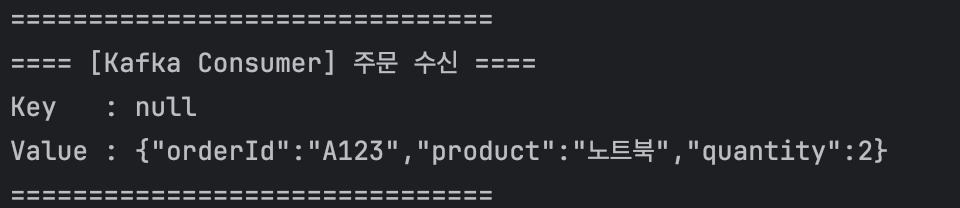
응답

'Server' 카테고리의 다른 글
| [Server] JPA에서 페이징 처리 (0) | 2025.09.02 |
|---|---|
| [Kafka] Kafka를 사용하는 이유(비동기는 기본, 느슨한 결합으로 확장성있는 아키텍처 지원) (1) | 2025.08.27 |
| [Kafka] 카프카, 이벤트기반 메시징 시스템 용어 정리 (3) | 2025.08.26 |
| [Spring] Spring Framework와 Servlet 그리고 DispatcherServlet (3) | 2025.08.08 |
| [Server] 서버에 index.html 띄우고 접속하기 (0) | 2025.08.04 |
Comments